
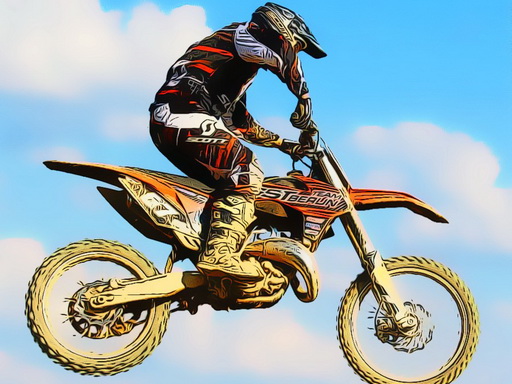
Dirtbike Stunts Jigsaw Puzzle
About
Dirtbike Stunts Jigsaw Puzzle delivers exactly what its name suggests: a set of jigsaw puzzles built around dirtbike stunt photography. The three-mode structure and six total images give it enough variety for short sessions, and the lack of a timer keeps the experience relaxed. Drag-and-drop controls work on both desktop and mobile, so accessibility is not an issue. The main limitation is scope; six puzzles is a modest amount of content, and players who finish them may want more. Still, for a free browser game aimed at families and casual puzzle fans, it covers the basics without unnecessary complications.
Rebuilding Stunt Scenes Piece by Piece
The goal in Dirtbike Stunts Jigsaw Puzzle is straightforward: each puzzle begins as a scrambled set of pieces, and your job is to drag them back into their original positions until the full image is restored. The pictures show dirtbike riders mid-stunt, so the completed result is a clear, static scene rather than an action sequence. That distinction matters because the challenge comes from visual matching, not reflexes. You are reading shapes, colors, and edges to decide where a piece belongs. [IMG_1]
Three Modes and Six Images
The game offers three selectable modes, and each mode contains two different images, giving you six puzzles in total. Switching modes changes the arrangement of pieces, which is how difficulty is adjusted. There is no separate slider or settings menu for complexity; the mode you pick determines the challenge level you face. This structure keeps the experience simple to navigate. You choose a mode, see the scrambled board, and start placing pieces. When one image is finished, you can move directly to the next without returning to a main menu. [IMG_2]
Controls and Device Support
Drag-and-drop is the only input method you need. On a desktop or laptop, you use a mouse to pick up a piece and release it where you want it to go. On a phone or tablet, your finger does the same job. The interface responds quickly to input, so pieces follow your cursor or touch without noticeable lag. Because the game runs in a web browser, there is nothing to download and no account to create. That makes it easy to start a puzzle during a short break or work through a larger image over a longer session. [IMG_3]
Solving Without a Timer
No countdown or time limit is present, so you can study the pieces for as long as you like. That design choice shifts the pressure away from speed and toward observation. Edge pieces are usually the most useful starting point because they form the border and give you a frame to work inside. Grouping pieces by distinct colors or patterns is another practical approach, especially in images where the background and the rider are visually different. Working on small sections rather than the whole board at once keeps the task manageable. If you get stuck, stepping away and returning later often makes connections easier to spot. [IMG_4]
Compatibility
FAQ
Comments
Sign in to comment
You must be logged in before posting a review or rating.
No comments yet. Be the first to comment!


Editorial Notes