Solitaire Sultan: Advanced Card Puzzle

Reviews
💡Solitaire Sultan: Advanced offers a polished card puzzle experience with intuitive controls and a calm pace. The undo feature reduces frustration, and the 9 foundation slots add depth to the classic solitaire formula. It is replayable due to the random deck, making each session unique. Ideal for unwinding or sharpening sorting skills.
Description
Game Introduction
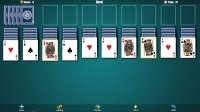
Solitaire Sultan: Advanced is a captivating card puzzle game designed for players of all ages. In this family-friendly game, your goal is to organize and collect cards by suit in 9 foundation slots. The game is built with HTML5 technology, ensuring smooth play on any modern web browser, whether on PC, mobile phones, or tablets. With full screen support, you can enjoy a clear and engaging experience. The deck is located in the upper left, with a distribution slot below and several cards to the right.
How to Play
To play, start by looking at the deck in the upper left corner of the table. Below it is the distribution slot, and to the right are several cards. In the center, there are 9 foundation slots where you must collect cards by suit. The first card in each foundation is a king. Then, place an ace of the same suit on it, followed by 2, 3, and so on. Use your mouse to drag each card to its correct foundation. Empty cells from the auxiliary columns on the sides are automatically filled with cards from your hand. You can only move cards one by one to the home cells, not between auxiliary columns. If you make a mistake, use the undo option to cancel your last move.
Game Features
Game features include a safe, non-violent environment suitable for all ages. The game is easy to learn with simple drag-and-drop controls. It supports full screen mode for an immersive experience. An undo option helps correct mistakes without penalty. The game works on any device with a modern browser, making it accessible anywhere.
Tips for Success
Focus on building foundations in order, starting with kings and then aces of the same suit. Use the undo feature freely to try different moves without penalty. Take your time—there is no time pressure, so plan each move carefully. Keep an eye on the auxiliary columns to manage your hand efficiently. Practice regularly to improve your speed and strategy.
Compatibility
Faq
Is Solitaire Sultan: Advanced free to play?
Can I play Solitaire Sultan: Advanced offline?
Does the game have a scoring system?
Are there different difficulty levels in Solitaire Sultan: Advanced?
Can I customize the card design or background?
Is there a leaderboard or social feature?
Other Similar Games

Freecell Solitaire Blue Puzzle

Free Cell Solitaire Puzzle

Pyramid Solitaire Card Puzzle

Spider Classic Solitaire Game

FreeCell Solitaire Puzzle

Tripeaks Classic Solitaire Puzzle
Spider Solitaire Card Game