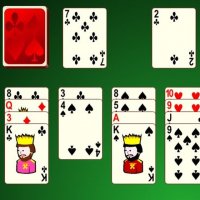
Free Cell Classic Solitaire

Reviews
💡Free Cell Classic is a well-made version of the beloved solitaire game. The interface is clean and easy to navigate. The timer adds a nice challenge without being stressful. Almost every hand is winnable, which encourages replayability and strategic thinking. It is a great game for players who enjoy logic puzzles and card games. The lack of intrusive ads makes it a pleasant experience.
Description
Game Introduction
Free Cell Classic is a solitaire card game that has been a favorite on computers for many years. The game uses a standard deck of 52 cards. Your goal is to move every card to four foundation piles, one for each suit, in order from Ace to King. Unlike many other solitaire games, almost every deal in Free Cell is winnable with the right strategy. This version adds a timer, so you can challenge yourself to complete the game quickly.
How to Play
The game board has eight tableau piles, four free cells, and four foundation piles. Start by dealing the 52 cards into eight tableau piles. The first four piles get seven cards each, and the remaining four piles get six cards each. The four free cells are empty at the start. Your task is to move all cards to the foundation piles. You can move one card at a time. Cards in the tableau must be placed in descending order and alternating colors. For example, you can place a red 7 on a black 8. Empty tableau piles can be filled with any card or a sequence. Free cells can hold one card each, which you can move back to the tableau or directly to the foundation. The game ends when all cards are in the foundation piles in ascending order by suit.
Game Features
Fun strategy gameplay that requires planning and patience. Free to play online with no downloads. Classic card challenge that is easy to learn but hard to master. Clean interface with smooth card animations. Timer adds a layer of challenge for experienced players. Suitable for all ages and skill levels.
Tips for Success
Free Cell Classic offers a thoughtful and engaging puzzle experience. It helps sharpen your planning and problem-solving skills. The game is relaxing yet mentally stimulating, making it perfect for short breaks or longer sessions. To improve, try to free up tableau piles early, use free cells wisely, and plan several moves ahead.
Compatibility
Faq
Is Free Cell Classic free to play?
Can I play Free Cell Classic on my mobile device?
Does Free Cell Classic have an undo button?
Is there a way to track my best times in Free Cell Classic?
Can I play Free Cell Classic without an internet connection?
Are there different difficulty levels in Free Cell Classic?
Other Similar Games

Freecell Solitaire Blue Puzzle

Free Cell Solitaire Puzzle

Pyramid Solitaire Card Puzzle

Spider Classic Solitaire Game

FreeCell Solitaire Puzzle

Tripeaks Classic Solitaire Puzzle
Spider Solitaire Card Game